
Docs Category
Git Security: Commit Signing, Secret Scanning, and PR Obfuscation Scanner
Critiq supports the practical Git security workflows most teams care about: commit signing, secret scanning before commit, and PR checks for obfuscated code, suspicious execution paths, and install-time backdoor patterns in pull request diffs.
Use this section if you need signed commits with SSH or GPG, staged secret scanning with gitleaks, or extra review safeguards for security-sensitive changes during pull request review.
Commit Signing
Git supports cryptographically signing commits to verify authorship. You can use either GPG keys or SSH keys for signing.
Option 1: Sign commits with SSH keys (Git 2.34+)
Use your existing SSH key for both authentication and signing:
-
Configure git to use SSH for signing:
git config --global gpg.format ssh git config --global user.signingkey ~/.ssh/id_ed25519.pub -
Enable automatic commit signing:
git config --global commit.gpgsign true -
Add your signing key to your git provider:
- Settings → SSH and GPG keys → New SSH key → Select "Signing Key" as key type
Option 2: Sign commits with GPG keys
Traditional GPG signing (supported by all providers):
-
Generate a GPG key:
Choose RSA and RSA, 4096 bits, and enter your name and email.gpg --full-generate-key -
List your GPG keys and copy the key ID:
Copy the key ID (the part aftergpg --list-secret-keys --keyid-format=longrsa4096/) -
Configure git to use your GPG key:
git config --global user.signingkey YOUR_KEY_ID git config --global commit.gpgsign true -
Export and add your public key to your git provider:
Copy the output and add it to the provider:gpg --armor --export YOUR_KEY_ID- GitHub: Settings → SSH and GPG keys → New GPG key
- GitLab: Preferences → GPG Keys
- Azure DevOps: User Settings → GPG Keys
Verification
Once configured, all commits made through Critiq (and git CLI) will be automatically signed. Your git provider will show a "Verified" badge on signed commits.
Hidden Character and PR Obfuscation Scanner
Critiq scans pull request diff hunks for hidden characters, code that is deliberately hard to review, and code that can execute attacker-controlled bytes. Findings are marked with warning badges in the file list so reviewers can inspect them before merge.
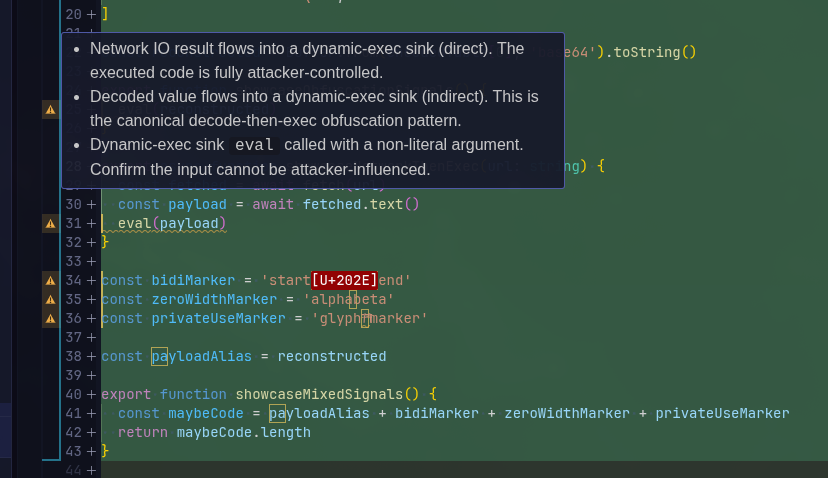
This protection is enabled by default. You can toggle it in Settings → Features → Security with Scan PR diff hunks for hidden Unicode and obfuscation.
- What gets scanned - Added and modified PR hunk content while reviewing a linked pull request.
-
Language coverage - Universal detectors run on any readable text. Language-aware
rules currently cover JavaScript, TypeScript, Python, PowerShell, Bash, PHP, Ruby, Go, Rust,
C#, Java, Kotlin, Lua, Perl, and VBScript. Manifest/path rules also cover
package.json,setup.py,build.rs, GitHub Actions workflows, andDockerfile. -
What is flagged - Hidden characters such as bidi controls, zero-width
characters, and private-use Unicode; high-entropy string blobs; encoded payload arrays;
machine-generated identifier names; decoder-to-execution flows; network-to-execution flows;
unsafe deserialization; dynamic library loading; suspicious shell execution; install hooks;
build scripts; GitHub Actions; and Dockerfile
curl | shpatterns. - How it appears - File-level warning badges, finding details in tooltips, and inline suspicious-line highlights in the diff viewer.
Secret Scanning
Critiq can scan your staged changes for secrets like API keys, tokens, and credentials before they reach your repository. When enabled, files are automatically scanned as you stage them, and any detected secrets trigger a warning before commit.
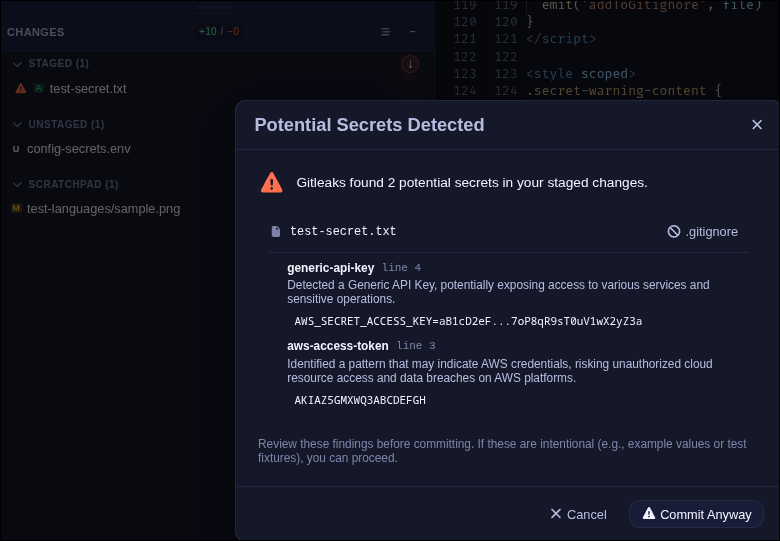
To enable secret scanning, go to Settings → Features → Security and toggle Enable secret scanning. Critiq uses gitleaks under the hood. You can install the managed scanner directly from Settings or point to your own binary.
- Managed scanner - Critiq downloads and manages gitleaks for you. Click Install Scanner in Settings to set it up.
- Custom binary - If you already have gitleaks installed, switch to Custom binary path and provide the path to your executable.
- Repo config support - Enable Prefer repository .gitleaks.toml to use project-specific rules when available.
When secrets are detected, you'll see a warning modal before committing. You can review each
finding, add files to .gitignore, or proceed anyway if the detection is a false
positive.