Docs Category
Pull Request Review
Critiq's PR review mode goes beyond line-by-line diff viewing. You can navigate a PR commit by commit, see comments in the context of the commit they were left on, track review progress at hunk level, and surface outdated comments inline. This section covers the full review workflow and the settings that affect it.
Commit-by-Commit Review
When a PR is linked, open the Commits panel from the right sidebar to see a chronological list of all commits in the PR. Clicking a commit switches the diff view and file list to show only the changes introduced by that commit.
- Per-commit comments: Comments left on a specific commit are shown inline when you navigate to that commit. Comments left on other commits are not shown, keeping the view focused on what changed in that commit.
- Outdated comments at HEAD: When viewing the latest diff (not a specific commit), comments whose code has since changed are shown inline, collapsed and dimmed, with an amber Outdated badge. See Outdated Comments Inline.
- Return to Latest: Click the Latest button at the top of the Commits panel to exit commit navigation and return to the full HEAD diff.
Commit-level Hunk Review Sync
In Settings → Features → Code Review, enable Commit-level hunk review sync to keep hunk completion state consistent as you move between commit and file review views. With this on, marking a hunk as reviewed in the per-commit diff also marks it in the HEAD diff, so your review progress reflects work done across both views rather than treating them separately.
This works alongside Hunk-level change tracking. Enable both for the most granular PR review workflow.
Stacked PRs
Critiq automatically detects when pull requests form a stack: a linear chain where each PR targets the previous PR's branch. Stacked PRs are grouped together in the PR dropdown for easier navigation.
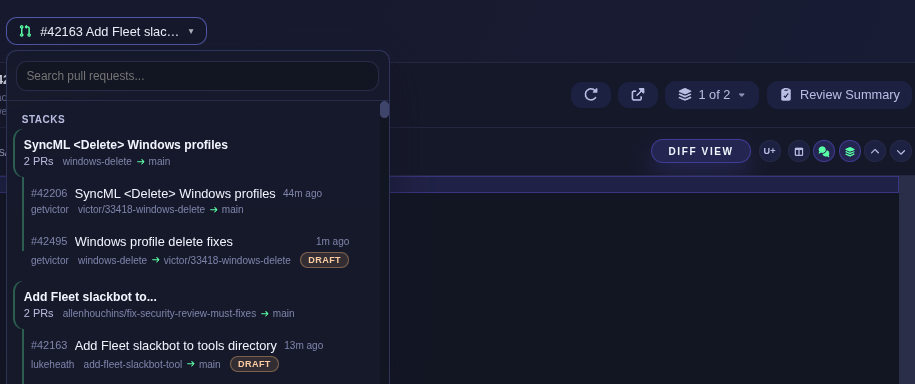
- Automatic detection - PRs are identified as stacked when their base branch matches another open PR's head branch.
- Grouped display - Stacked PRs appear together in the PR dropdown with visual connectors showing the chain order.
- Stack navigation - When reviewing a stacked PR, a dropdown in the header shows your position in the stack (e.g., "2 of 3") and lets you quickly jump between PRs.
- Merge order - PRs are displayed root-first, reflecting the order they should be merged (merge the base PR first, then retarget remaining PRs).
Hunk-level change tracking in PRs
In Settings → Features → Code Review, enable Hunk-level change tracking in PRs to show which individual hunks have been reviewed, modified, or are new. This is more precise than file-level tracking. Status appears as a small badge in the hunk header.
Outdated Comments Inline
When code changes after a PR comment was left, that comment becomes outdated. Critiq shows outdated comments inline in the diff at HEAD, collapsed and dimmed by default, so you can see at a glance that a comment existed on code that has since changed, and decide whether it still applies.
- Collapsed by default - Outdated threads show only their header (amber Outdated badge, author, line number). Click the header to expand.
- Toggle visibility - Right-click the Show/Hide comments button in the diff toolbar to toggle Show outdated comments. This setting is persisted across sessions.