
Docs Category
Monorepo Git Workspaces
Critiq supports monorepos by letting you open a focused workspace inside a larger repository. Workspaces keep the file explorer scoped to a subfolder while still letting you review changes across the entire repo.
If you need a Git client for monorepos, the key idea is simple: workspace-scoped browsing with repository-wide comparisons, review flows, and symbol intelligence.
Adding a Workspace
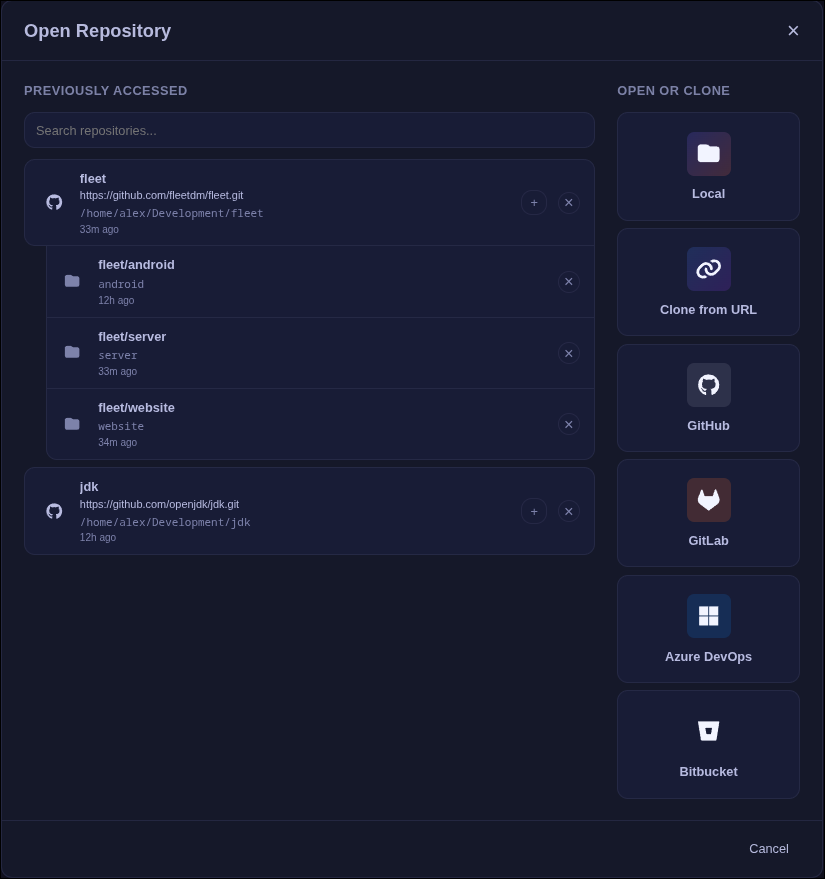
- Open the repository selection window and add the repository root.
- In the repository picker, click the "+" button next to the repo to add a workspace.
- Select the workspace folder (for example:
packages/frontend). - Optionally set a display name for the workspace.
Workspace Behavior
- The file explorer shows only the workspace subfolder.
- Branch comparisons and PR reviews list all changed files, grouped by workspace vs outside the workspace.
- The Changes list and commit file lists keep the same workspace/outside grouping.
- Language servers and symbol indexing run from the workspace root for accurate monorepo intelligence.
- Conflict resolution covers the entire repository.