
Getting Started
On this page
A tour of the Critiq window, the first things to set up, and what changed in recent releases. Start here if you are new to Critiq or catching up after an update.
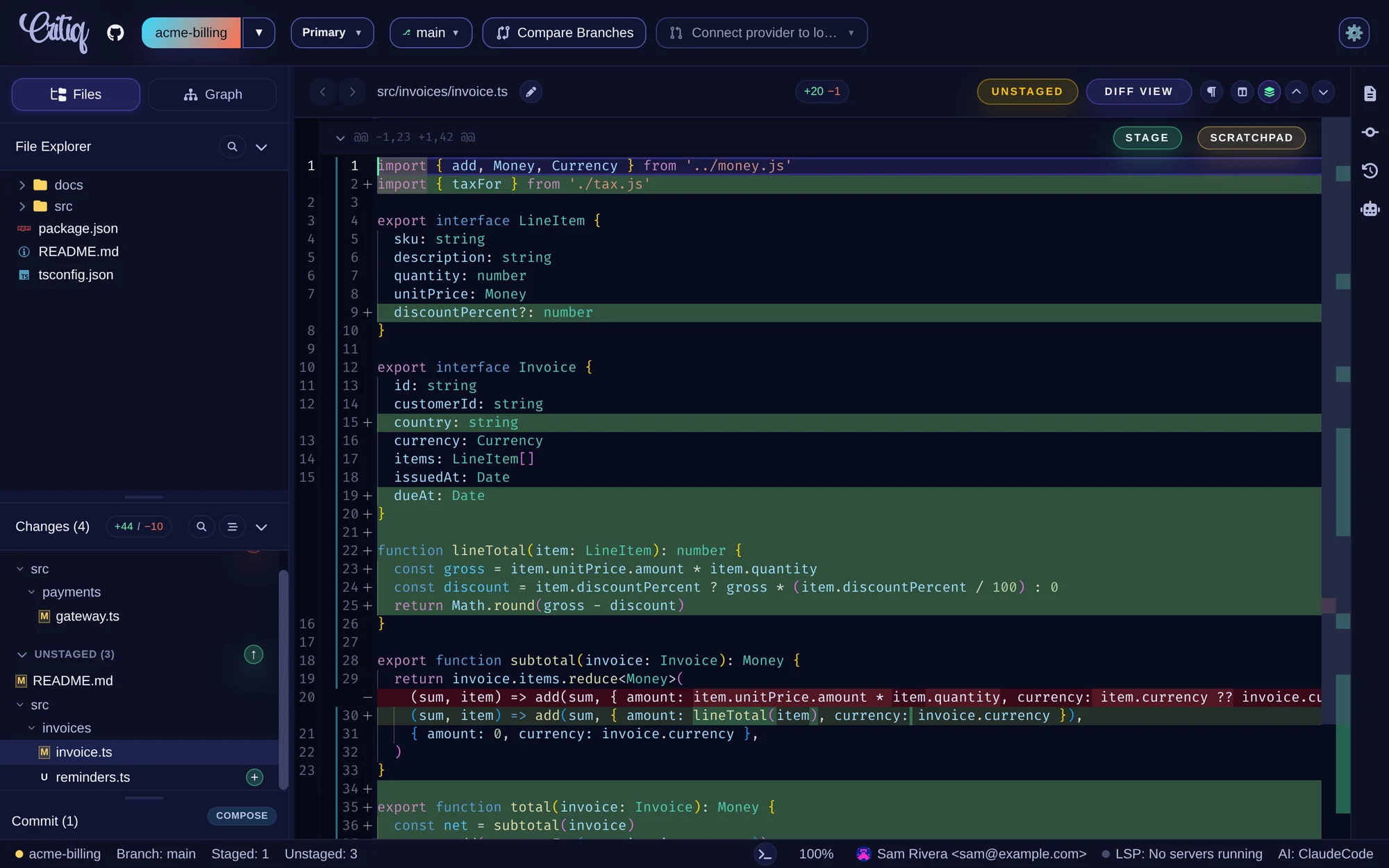
The Critiq Window
- Header - From left to right: the repository (click it to open another one), the checkout (primary folder or a linked worktree), the branch, Compare Branches, the pull request picker, and Settings.
- Left sidebar - Files shows the file explorer and the Changes panel with staged and unstaged files. Graph shows branches and the commit graph. The Commit drawer and the Compose button sit at the bottom.
- Diff viewer - The selected file's changes. Stage a hunk with Stage, a single line with the +/- gutter buttons, or park changes with Scratchpad. The toolbar switches between diff, file, and preview views.
- Right sidebar - File info, commit details, Session History, and the AI Assistant (shown when an AI provider is selected).
- Status bar - Repository and branch, staged and unstaged counts, the integrated terminal, editor zoom, your commit identity, language server status, and the active AI provider.
First Steps
- Enter your license key or start the 14-day trial (see License and Activation).
- Open a repository: click the repository button in the header and choose Local, Clone from URL, or a connected provider.
- Connect your Git host in Settings → Integrations to browse and review pull requests (see In-App OAuth). SSH keys and credential helpers keep working for push and pull.
- Pick an AI provider in Settings → AI Provider if you want AI review, commit messages, and explanations (see AI Review and Providers). Everything else works without one.
- Install language servers for the languages you use to get hover, go-to-definition, and references in diffs (see Code Navigation).
What's New
1.13
- OpenCode joins Claude Code and Codex as an AI provider, using your installed OpenCode and its models (Coding Agents).
- Suggest commits in the Commit Composer groups your changes into commits for you (Suggest commits with AI).
-
Project review rules in
.critiq/rules.jsonand an AI review effort setting (Project Rules, Review Effort). - Change a repository's remote from Repository Settings (Opening Repositories).
- Markdown preview highlights added lines, so you can review prose the way you review code (Markdown Preview).
1.12
- Worktrees get their own checkout menu in the header, with creation and deletion (Worktrees).
- Pull requests from GitHub forks can be reviewed (Pull Requests from Forks).
- Recompose splits an existing commit into several commits, or a pull request into stacked branches (Recompose).
- File filter with fuzzy matching in the changes, explorer, and comparison panels (Filtering File Lists).
- Explain commit from the commit graph, editor zoom, French and Spanish interface languages, favorite repositories, and Pull then Push in the force-push dialog.
The full list of changes is in the changelog.